
View script function - alarms and aggregated alarms
On this page
Aggregated Alarm Table
Aggregated alarm table is useful tool to find out basic statistics about historical alarms. Provided function will automatically compute occurrences and total times for each alarm active in given time period. Result will look as following:
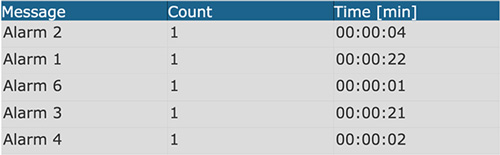
You can render alarm into any Active Area.
var options={};
options.areaId=1; //number of Active Area to render a table
options.limit=10; //how many alarms should be visible in a table (counted by highest occurrence)
options.column0_name=”Message”; //name of first column
options.column1_name=”Count”; //name of second column
options.column2_name=”Time” //name of third column
options.column0_width=200; //column width
options.column1_width=200;
options.column2_width=200;
options.textSize=150; //text size in percent
myscadaCreateOccurencesAlarmTable(options);
Aggregated Alarm Chart
Same way as you generate aggregated alarm table, you can create aggregated alarms chart.
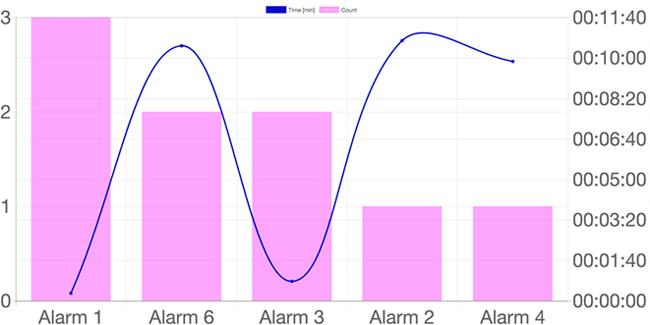
var options={};
options.areaId=1; //number of Active Area to render a chart into
options.limit=10; //how many alarms should be visible in a chart (counted by highest occurrence)
options.labelTime=”Time [min]”; //caption for time axis
options.labelCount=”Count”; //caption for occurrence axis
options.colorTime= ‘rgba(0,0,255,1)’; //color of time values
options.colorCount= ‘rgba(200,50,50,1)’; //color of count values
options.fontSize=16; //font size in px
myscada.createOccurencesAlarmChart(options);
Reading Online Alarms
You can retrieve currently active alarms using function
myscada.readAlarmsOnline(options,callback);
With the first parameter object you can specify a filter to use on online alarms, second is a callback function to get the data. To use this function, please use a visual dialog located in the editor top bar.
Example:
//read online alarm data
var options={};
options[‘severity’]=100;
myscada.readAlarmsOnline(options, function(err,result)
{//process each row of returned data
for (i=0;i<result.length;i++)
{
var msg=result[i].cell.msg; //Message
var status=result[i].cell.stat; //Alarms status
var severity=result[i].cell.sv; //Severity
var area=result[i].cell.area; //Area field
}
});
Reading Alarm History
You can retrieve alarm history using following function:
myscada.readAlarmsHistory(options,callback);
First parameter is config object and second is the callback function which is called after data are available. To use this function, please use a visual dialog located in the editor top bar.
Example:
//read historical alarm data
var options={};
options[‘timeFrom’]=new Date()/1000-60*60;
options[‘timeTo’]=new Date()/1000;
options[‘limit’]=1000;
options[‘limitOccurence’]=100;
myscada.readAlarmsHistory(options, function(err,result)
{//process each row of returned data
for (i=0;i<result.length;i++)
{
var msg=result[i].cell.msg; //Message
var status=result[i].cell.stat; //Alarms status
var severity=result[i].cell.sv; //Severity
var device=result[i].cell.dev; //Device field
var area=result[i].cell.area; //Area field
var acttime=result[i].cell.acttime; //Activation time
var deacttime=result[i].cell.deacttime; //Deactivation time
var acktime=result[i].cell.acktime; //Acknowledge time
var acktxt=result[i].cell.ak; //Acknowledge Value
var value=result[i].cell.ackv; //Acknowledge Value
var actval=result[i].cell.av; //Activation value
var deactval=result[i].cell.dv; //Deactivation value
var user=result[i].cell.user;
}
});
Confirming Alarms
You can confirm alarms using following function:
myscada.alarmConfirm(message, options, callback);
First parameter is message into the alarm log, second is the options object allowing you to specify filter of what type of alarms should be confirmed and last one is a callback function which is called after the function is processed.
Filtering alarms can be done by following parameters: alarmIDs, severityMin, severityMax, area, message, device.
- Note: Only alarms active at the time when this function is called will be confirmed.
Example:
var options={};
options.alarmIDs=[1,2,3,5,6]; //confirm alarms with following IDs only
options.severityMin=5; //confirm only alarms with severity 5 and more
options.severityMax=10; //confirm only alarms with severity 10 and less
options.area= ‘area1’; //confirm only alarms from area1
options.message = ‘message1’; //confirm only alarms with message1
options.device = ‘device1’; // confirm only alarms with device equal to device1
myscada.alarmConfirm(‘alarm confirm from a script’, options, function (err)
{//alarms confirmed
});