
myDESIGNER › myDESIGNER › Components & Library
Components parameters
On this page
Combo Box
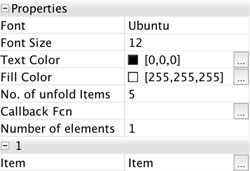
| Parameter | Explanation |
| Font | Font name |
| Font Size | Size of the text |
| Text Color | Text Color |
| Fill Color | Fill Color |
| No. of unfold items | When is combo box unfolded, specify how many items you want to see |
| Callback Fcn. | When user selects an item, you can run a custom function. Define a function in the View script and write here its name |
| Number of elements | Total number of elements in the Combo box |
List Box
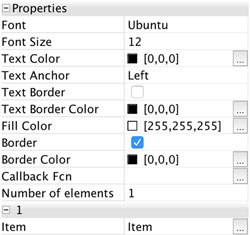
| Parameter | Explanation |
| Font | Font name |
| Font Size | Size of the text |
| Text Color | Text Color |
| Text Anchor | Text align, to the left, center or to the right |
| Text Border | Select to show border around each item |
| Text Border Color | Color of the border around an item |
| Fill Color | Fill Color |
| Border | Select to show border around whole component |
| Border Color | Color of the border around whole component |
| Callback Fcn. | When user selects an item, you can run a custom function. Define a function in the View script and write here its name |
| Number of elements | Total number of elements in the Combo box |
Text Box
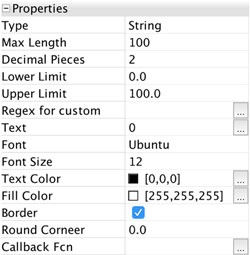
| Parameter | Explanation |
| Type | Specify if user should enter only numbers, strings, or custom values into the text box. If you specify number, please fill also the Limit and decimal places values. If specifying custom, please fill in the regex function for input check. |
| Max Length | Maximum number of characters entered |
| Decimal Pieces | Maximum number of decimal pieces entered |
| Lower Limit | For numbers only: minimum number allowed |
| Upper Limit | For numbers only: maximum number allowed |
| Regex for custom | For custom type only: enter regex by which is user input checked |
| Text | Default text or number |
| Font | Font name |
| Font Size | Size of the text |
| Text Color | Text Color |
| Border | Select to show border around whole component. |
| Round Corner | If you want rounded corners, please specify a radius |
| Callback Fcn. | When user selects an item, you can run a custom function. Define a function in the View script and write here its name |