
Page layout
The Layout page defines the arrangement and style of the page content. In myDESIGNER, you can create multiple user-defined layouts. Each view that you create can use different layouts.
- Note: You can create new layouts at any time during the creation of your project.
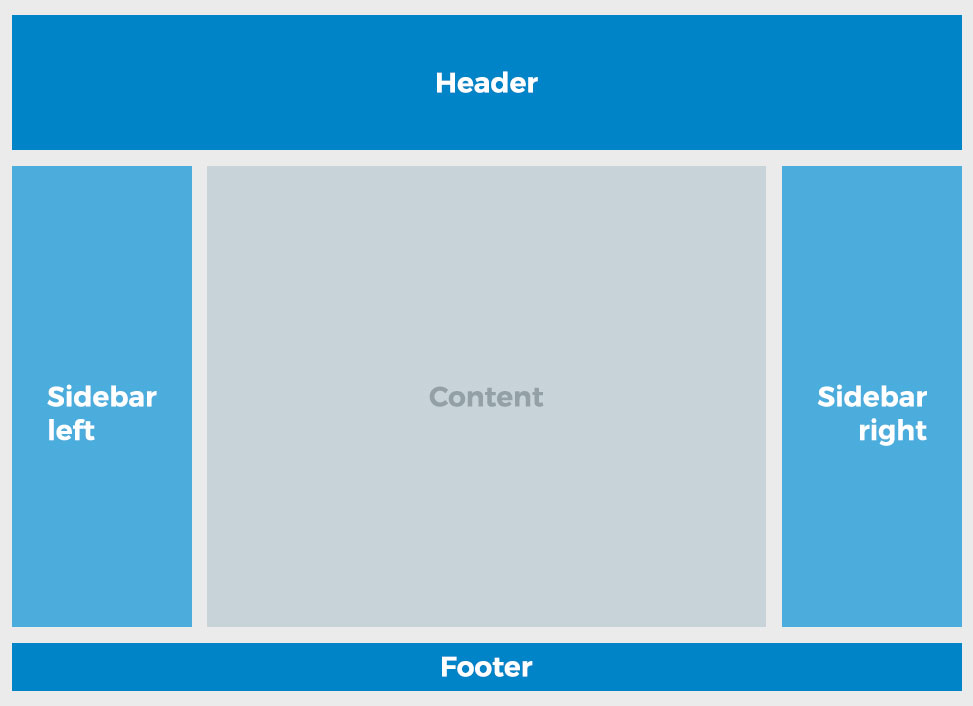
You can see all the options that your layout can have in the following picture:
-
Header - top section that can be used, for example, to display a logo, name, logged user, main menu, etc.
-
Main Content - section displaying your views; it sits prominently in the middle of the page.
-
Left/Right Sidebar - columns on both sides of the main content section; useful for displaying additional menus, pictures, etc. or can be used for control buttons and gauges. Sidebars can be visible or shown upon user action.
-
Footer - bar spanning the bottom of the page.
-
Note: To use the Layouts, first you have to create Layout Views. The Layout Views behave exactly the same as regular views; therefore, you can apply any functionality to them, such as animations, effects, or view scripts.