
myDESIGNER › myDESIGNER › Views & Layout
Data-Log views
Each data log can have defined multiple tabular views.
- Watch video describing this functionality: https://www.youtube.com/watch?v=wzxKQ_AUCn8
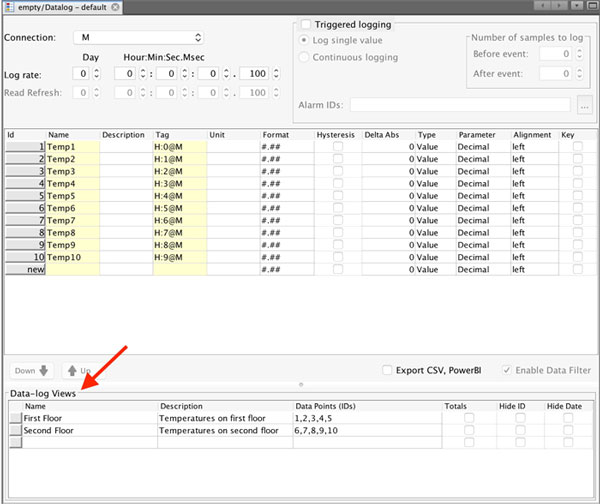
You can define the data-log views in the same window as you define the data-log.
Tabular views enable displaying all captured data from the data-log in the form of a table.
The Data-log view has following parameters
| Parameter | Description |
| Name | Enter a name for data-log view |
| Description | Short description |
| Data Points (IDs) | List of data points used in this data-log view. For each data point, you can set up configuration parameters in the editor. |
| Totals | Shows the totals at the end of the table. |
| Hide ID | Hides the ID (#) column. |
| Hide Date | Hides the Date column. |
First, fill in the name and description. Then click the Data Points column and click on the “…” button to include data points in your data-log view. You will be presented with the data points selection dialog.