
Creating database type connection
On this page
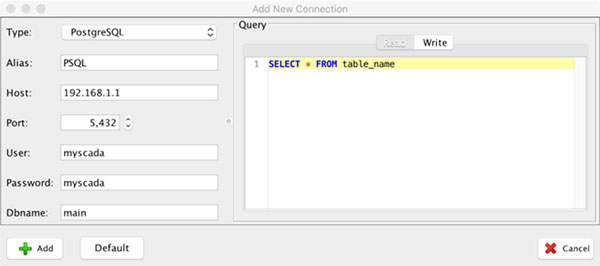
mySCADA is very strong in connecting to external SQL databases. It is surprisingly easy to connect and use SQL databases in your project. To get started, please select the Database type. You will be presented with the configuration dialog:
Database Type
As you can see, the first option is the Type of the database. You have the following options:
- PostgreSQL
- Microsoft SQL
- Oracle
- mySQL
- sqlite
- ODBC
As you can see, all major databases are supported. On the Windows platform, you can also connect the other database types using the ODBC driver.
Alias
Again, the next option is Alias, and you must fill it to use your connection in your project.
Database Specific Options
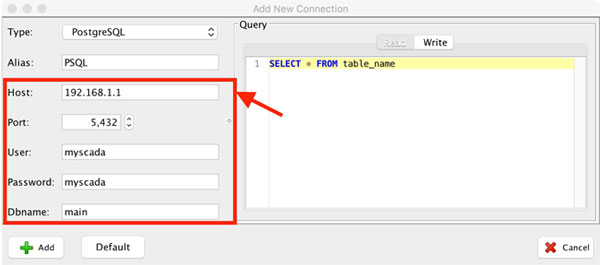
Then you should fill in the database specific options:
SQL Query Specification
On the right side of the dialog, you can specify an SQL Query to the database. This query will be used to retrieve data from the database. Then you can use this data anywhere in your project. Query dialog type is divided into two sections:
Read
SQL Read Query. This query is used to read values from the database. You can specify any valid query to the database, including conditional statements.
Write
In the Write Query section, you should specify a TEMPLATE for the SQL Query, which will be used later for the write commands. In the query, you should use a placeholders #1#, #2#, and so on in place of values. The placeholders will be replaced with real values provided from the write/set command during runtime.
Follow these steps to write values to the database:
1. Specify a Write SQL Query in the connection dialog. In our case, we will write 2 values to the database 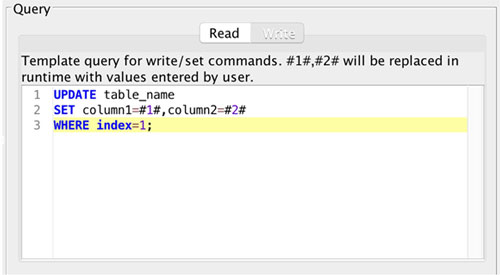 2. Use the Write/Set command to write values to the database using the template query
 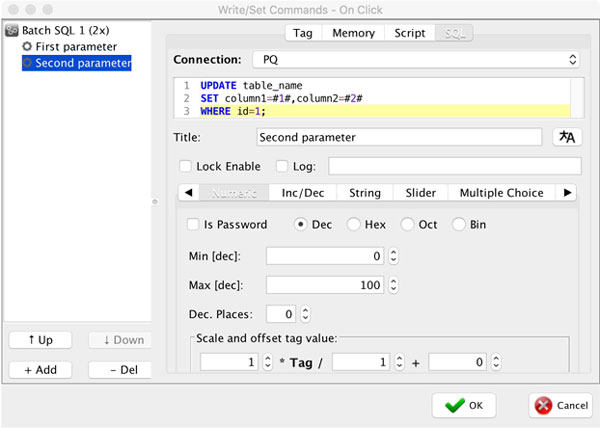 3. When the write/set command is executed, your query to the database will change to: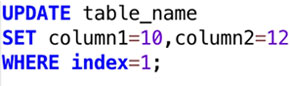
- TIP: You can create multiple connections to one database to use different SQL queries and retrieve multiple data.