Analog alarms
On this page
Analog alarms are tied to analog values read from the PLC. Along with common parameters, which are the same for both digital and analog alarms, you specify the minimum and maximum values for your tag or equation. You can also specify the Dead-band region for any value to eliminate false alarms. The number of alarms tied to one tag is not limited. In addition, you can define complex conditions, including multiple tags or mathematical conditions for a single alarm.
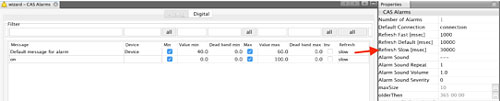
 Description of Alarm table fields:
| Unique ID | Automatically generated ID; needed if accessing alarms from the Server-side Script |
| Tag@Conn / *alias | Tag (Address) or Equation specifying data read from PLCs |
| Severity | Unsigned integer value specifying importance of given alarm; the lower the number, the higher the priority |
| Area | You can divide alarms by the geographical or virtual area they belong to; area is a string value that you can use to filter the alarms |
| Message | Message of your alarm |
| Device | Name or description of a device the alarm belongs to; one device can have multiple alarms defined |
| Inv (Inverse) | Inverts an alarm (if a digital alarm is inverted it will be active at 0; for analog alarm activation, area is reversed) |
| Hide | Enables hiding the alarm from the user; this is useful when you are using alarms as a condition in the triggered data-log; hidden alarms are not shown in the Alarm window and are not logged in the database. |
| Delay | Specifies the delay in milliseconds of how long the condition must be active to activate the alarm; this is the time hysteresis function |
| Refresh | Specifies how often your alarm will be refreshed; you can use default, fast, or slow. You can change the refresh values for each group in the Properties window. |
| Format | Defines how the value will be shown in the alarm table; use the ‘##.#’ format for specification |
| Sends an email upon each alarm activation or deactivation | |
| SMS Act | Sends a message upon each alarm activation |
| SMS Deact | Sends a message upon each alarm deactivation |
| G0 - G9 | Checks appropriate user group to receive alarms by email or SMS |
Unique ID
Each alarm has a Unique ID, which is created when you define a new alarm; its value is fixed once the project is put into the runtime mode for the first time. This value is unique for all alarms, meaning that each alarm has its own Unique ID that is saved in the alarms’ definition file. Once this ID has been created, it will remain until the alarm is removed from the definition table.
Tag@Conn / *alias
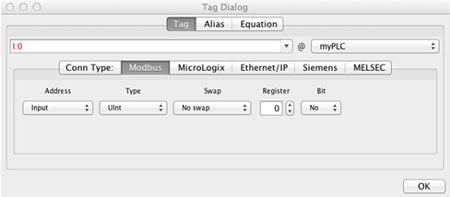
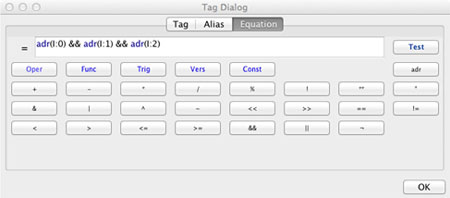
Each alarm must be connected to a tag or equation. The Tag is the value read from PLC (or your computed value from the script); with Equation, you can tie your alarm to multiple tags or evaluate complex formulas.
Specifying a tag:
Specifying a complex formula:
You can create multiple alarms tied to one tag, as long as the alarm descriptions are different so that alarms operate correctly.
Severity
Alarms can range in severity from 0 (most severe) up to an unsigned integer value (least severe), to indicate different levels of importance.
For example, an alarm with severity 10 might warn that a tank is half full of liquid, while another alarm with severity 5 indicates that the tank is about to overflow. Both alarms monitor the same tag but have different severity levels.
When you set up the alarm severity, specify what the severity levels mean and what actions they will trigger. Severity determines the order in which alarms are displayed in the alarm list.
Alarm areas
The alarms can be grouped in different areas so that they can be displayed in the alarm window based on the area to which they belong. This may be helpful and enable you to divide the alarms according to the different plant zones they come from.
Message
Alarm messages report information about alarms.
Device
You can define multiple alarms for a single device. In the live alarm view or during a browsing of alarm history, you can filter your data based on device value.
Minimum and Maximum values
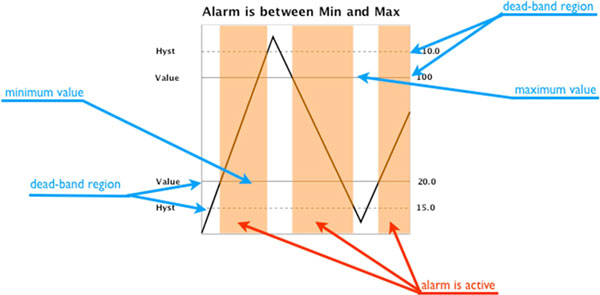
Minimum and maximum values are available for analog alarms only. By default, you specify the region when the alarm will be active. So if you would like to activate an alarm when the level in a tank is equal to 90 and stop the alarm at level 100, your minimum value will be 90 and the maximum value will be 100.
Inv (Inverse)
This parameter lets you invert your alarm definition. For a digital alarm, the alarm is activated when the value is equal to 0 and deactivated when equal to 1. For analog alarms, when ‘inverse’ is active, you specify the minimum and maximum values of the region when the alarm is NOT active.
Recipients (G0 up to G9)
Through these properties, you can select the recipient user group to which the message, SMS, E-mail, etc. is to be sent. The user profile, which is defined through the ‘Users’ settings, must contain a telephone number or E-Mail for sending messages.
Dead-band
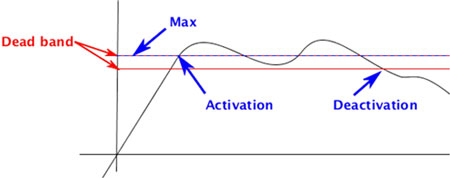
With some measured values, such as line pressure, tag values can fluctuate rapidly above and below a critical threshold. Where such conditions exist, you can create a dead band as a buffer to prevent the fluctuations from triggering unnecessary alarms.
 Specifying frequency of alarm checks
The system does not check for alarms more frequently than the Refresh update rate specified in the alarm definition.
Match the maximum update rate to the rate at which you expect tag values to change. For example, if you are monitoring temperatures that fluctuate slowly, check alarms less frequently than when you have a manufacturing process that changes temperature rapidly.
You can specify one of three possible refresh rates: default, slow, or fast. Each refresh rate group can be changed in the Properties window.