
myDESIGNER › myDESIGNER › Connections & Protocols
OPC UA connection configuration
With myDESIGNER, you can set connections to the OPC servers and the following parameters.
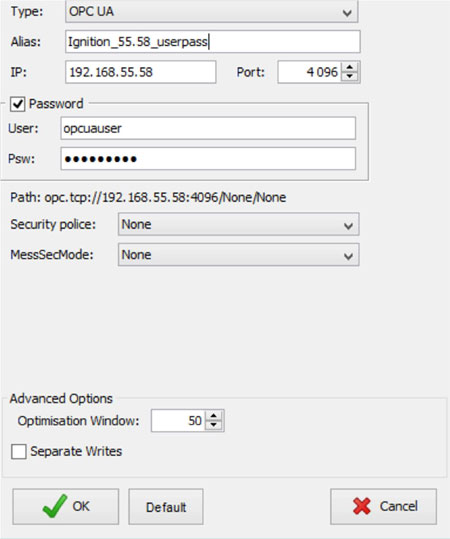
- IP Address, Port – IP address and port of the OPC UA server
- User, Password (Optional) – credentials to the OPC UA server, if configured on the server
- Security Policy (Optional)
- Basic128Rsa15 - uses 128-bit cryptography
- Basic256 - uses 256-bit cryptography
- None (Default)
- Message Security Mode (Optional)
- SignEnc - Signs and encrypts the messages
- Sign - Signs the messages
- None (Default) - No security
- Certificates (Optional) - you should provide a private key and associated certificate in the PEM format; you can easily recognize the PEM format that the certificate file will begin with “-----BEGIN CERTIFICATE-----” and end with the sentence“-----END CERTIFICATE-----”.