Linking views with PLC
On this page
There are two options to link your visualization with the PLC:
Animations
With animations, you link the visual appearance of graphic objects with real values read from the PLC. The visual change is reflected immediately, e.g. you can show PLC tag/variable values in a text element, change the fill and stroke color of an object, etc.
-
Note: Multiple animations can be applied to the same object.
-
Watch video describing this functionality: https://www.youtube.com/watch?v=_cPPysaTWKc
Effects
With effects, you add dynamic effects to graphic objects. An effect is the visual appearance of an object in a specified time sequence and can be triggered either by a tag/variable from the PLC or by a user’s action, i.e., finger tap or mouse click.
- Watch video describing this functionality: https://www.youtube.com/watch?v=GTOFCwrRTPM
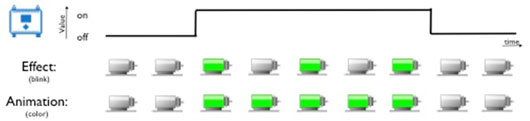
Imagine you want to display a blinking motor on your visualization if the tag/variable read from the PLC is equal to 1.
1. Set the Blinking effect on the motor by specifying the blinking speed and infinite repeat. This way the motor will be blinking as long as the tag read from the PLC is equal to 1.
2. If you use the Color animation instead, the motor will change its color if the value read from the PLC equals 1 and return back to normal when the value is 0.