Aggregated values
On this page
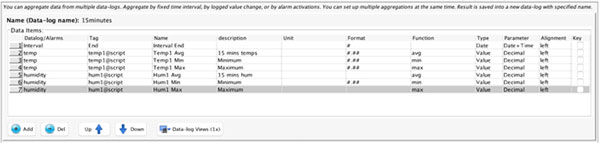
Aggregated values are the values from one or multiple data logs aggregated using the “aggregate” function. You can add an arbitrary number of values (columns) from multiple data logs.
First item in the table is always Interval End. Aggregated data log has always two dates: start and end of interval.
Then you can add as many aggregated items as you wish. Table has following columns:
| Column | Description |
| Datalog/Alarm | Source datalog (or Alarm) |
| Tag | Source tag (or Alarm Severity) |
| Name | Name – eg. name of aggregated item |
| Description | Description of aggregated item |
| Unit | Unit (useful in trends) |
| Format | Format for numeric values use #.## notation |
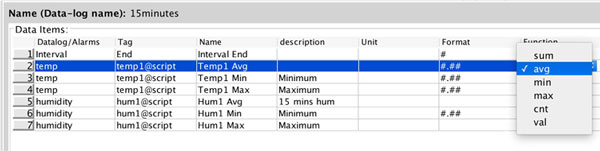
| Function | Aggregate function (sum, avg, min, max, ..) |
| Type | Type of item eg. Numeric or String |
| Parameter | Additional format parameter for Type item |
| Alignment | Align item in data log view table to the left, right, or middle |
| Key | If you want to perform a search by this item, tick it please. |
To add aggregated value for data log:
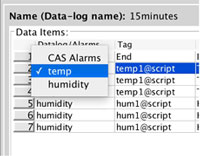
- Select data log name in combo box
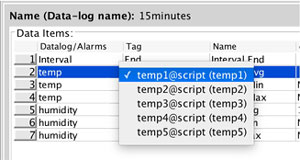
- Select tag in combo box
- Fill rest of the table
To add aggregated alarm count or alarm activation time
- Select CAS Alarm
- Enter maximum severity
- Fill rest of the table
First, select a data log
Secondly, select a tag from datalog
Then fill in the Name, description and also the aggregate function:
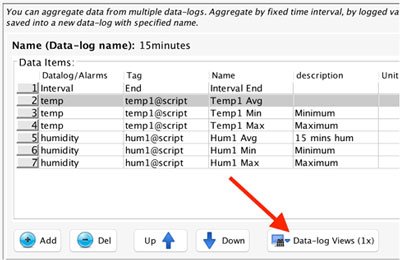
Once you are done, don’t forget to also set up the data-log view, you can do it by clicking on the “Data log views” button:
You will be presented with data-log view definition, it is the same as when you define a data log view in data log definitions (please see chapter Data logs)
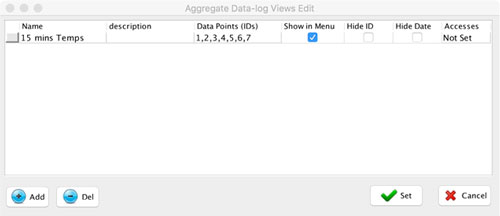
Simple Example:
In this example, we are aggregating data from 2 different datalogs “temp” and “humidity”