
Using the RS-232 interface
COM1 is routed according to EIA/TIA-561 Pin Layout (serial interface via 8-pin connector) while using only Rx,Tx and Ground pins. Every serial device connected to the port COM1 must have an interface cable conforming to EIA/TIA-561 standard. On one end this cable must have a male RJ-45 plug and on the other end it must have a connector fitting into your serial device. The diagram shows the pin connections for the COM1 conversion cable from RJ-45 “Port 1” into regular “CANON DB-9” connector.
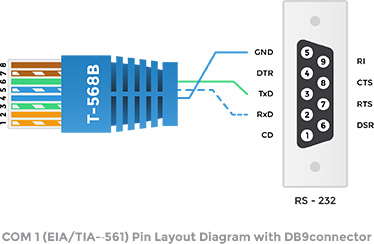
| RJ-45 Pin | Pin name | CANON DB-9 Pin | Function |
| 1 | GND | Do Not Use | Do Not Use |
| 2 | RxD | Do Not Use | Do Not Use |
| 3 | TxD | Do Not Use | Do Not Use |
| 4 | GND | 5 | Signal Ground |
| 5 | RxD | 2 | Receive pin |
| 6 | TxD | 3 | Transmit pin |
| 7 | A | Do Not Use | Do Not Use |
| 8 | B | Do Not Use | Do Not Use |
COM2 is using only Rx,Tx and Ground pins. Every serial device connected to port COM1 must have an interface cable that conforms to the defined pinout. On one end this cable must have a male RJ-45 plug, on the other end it must have a connector that fits into your serial device. The diagram shows the pin connections for the COM2 conversion cable RJ-45 “Port 1” to regular “CANON DB-9” connector.
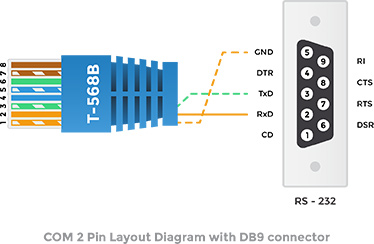
| RJ-45 Pin | Pin name | CANON DB-9 Pin | Function |
| 1 | GND | 5 | Signal Ground |
| 2 | RxD | 2 | Receive pin |
| 3 | TxD | 3 | Transmit pin |
| 4 | GND | Do Not Use | Do Not Use |
| 5 | RxD | Do Not Use | Do Not Use |
| 6 | TxD | Do Not Use | Do Not Use |
| 7 | A | Do Not Use | Do Not Use |
| 8 | B | Do Not Use | Do Not Use |